
Is Facebook Listening to Our Conversations?
My wife is convinced that Facebook is listening to her conversations. One minute she’s telling me about a fancy lamp she saw online—don’t worry, she didn’t buy it—and the next, she’s getting hit with ads for that exact lamp all over Facebook and Instagram.
The first thing to clear up is this: Facebook isn’t listening to your conversations through your microphone to target ads. There’s no credible evidence that it’s doing that. (And honestly, that would be a much bigger scandal than ads for lamps.)
What is happening, though, can feel just as invasive.
This isn’t necessarily malicious—but it is something most people don’t fully understand. A lot of data gets shared between websites, apps, and advertising platforms. Personally, I don’t mind seeing ads related to things I’ve searched for—but most people don’t realize how those ads are actually following them around.
Why Does This Happen?
In simple terms: tracking and ad targeting.
When you visit a website:
- The site can store information in your browser (cookies or similar tracking methods)
- That site can share data with advertising platforms like Meta (Facebook/Instagram)
If you later use Facebook or Instagram:
- Those platforms can match that activity to you (especially if you’re logged in)
- Advertisers can show ads to people who visited their site recently
So if you looked at a Turkish lamp, the company can say:
“Show this ad to anyone who visited our site in the last 30 days”
…and now that lamp follows you around.
No microphone required.
How Do You Reduce It?
On mobile devices, the easiest way to reduce this kind of tracking is:
1. Use a privacy-focused browser
Both do a good job of:
- Blocking trackers
- Limiting cross-site tracking
- Reducing how much data gets shared
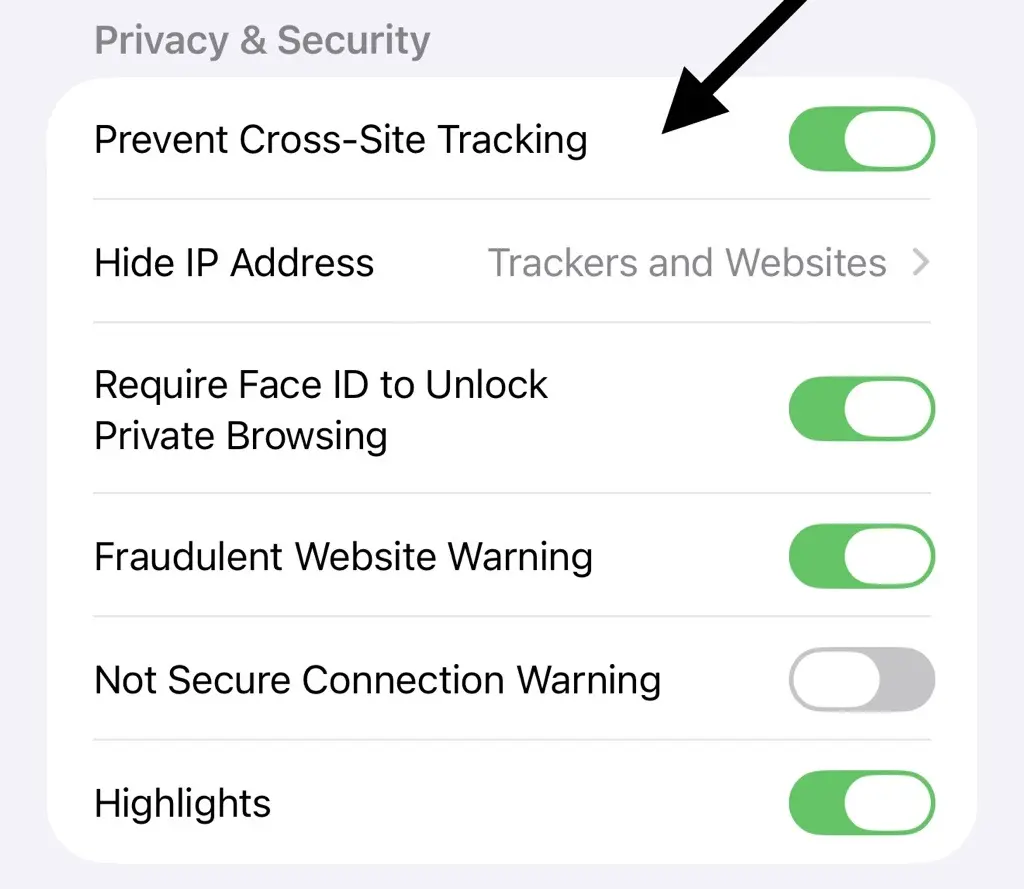
2. Adjust Safari settings (if you use it)
On iPhone/iPad:
Settings → Apps → Safari → Prevent Cross-Site Tracking
Safari already blocks a lot by default, but this setting should be enabled.
“I’ve Done All That… Why Am I Still Seeing Ads?”
Good question—and this is where most people get tripped up.
If you:
- Stay logged into Facebook or Instagram
- Use “Sign in with Facebook” or “Sign in with Google”
- Browse inside apps instead of a private browser
…then you’re still allowing data to be tied back to you.
In that case, you’re essentially telling platforms like Google and Meta who you are, and they can use that information for ad targeting.
What We Recommend
A simple, practical approach:
- Use DuckDuckGo or Brave for general browsing
- Avoid staying logged into Google or Facebook while browsing
- Use the Facebook and Instagram apps only for those platforms
This won’t eliminate ads—but it significantly reduces how targeted and persistent they are.
Need Help?
If you’d like help checking your device, adjusting settings, or just understanding what’s going on, feel free to give us a call at 318-256-1213 or schedule a time with us.